

Usha — Skincare Companion App
Solo product build from research through shipping. I owned everything: product strategy, UX research, interaction design, React Native frontend, Supabase backend, and test coverage. User needs drove the technical decisions, not the other way around.
My Role
// What I personally ownedI was the only person on this project. That means every decision — from the data model to the button copy — was mine. Product research, competitive analysis, user flow design, visual design, React Native implementation, Supabase schema, state management architecture, GDPR compliance, and test automation. No handoffs, no specs thrown over a wall, no 'that's not my department.' When a UX decision created a technical constraint, I felt it immediately and adapted both sides.
The Problem
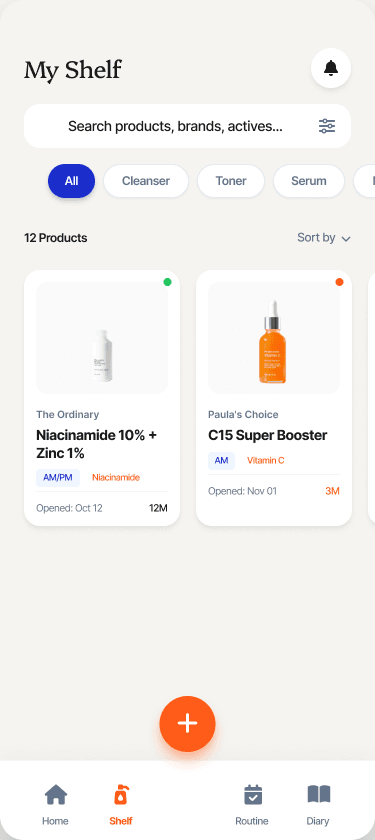
// Why this needed to existThis started with a drawer full of skincare products. Half of them were open and in my routine, the other half were waiting — but I couldn't remember what I had, what was almost finished, or what I'd already repurchased by mistake. I wanted something simple: a shelf of what I own, a way to track what's open versus what's in the backlog, and a nudge when something's running low.
I tried every skincare app I could find. The problems were consistent:
- Account walls — every app required sign-up before you could do anything
- Bundled consent — product tracking and health data lumped under a single 'accept all'
- No offline mode — lose signal, lose your unsaved routine
- Weak barcode coverage — single-source databases that didn't recognise half the European brands on my shelf
The tools that existed were built to capture data, not to solve the actual problem: knowing what you have, using what you've got, and not buying duplicates.
Product strategy, UX, frontend, backend, compliance, and testing — one person, 10 weeks
Full functionality without account creation; cloud sync as an upgrade, not a gate
Three-tier data model with independent consent and deletion paths for health data
Key Design Decisions
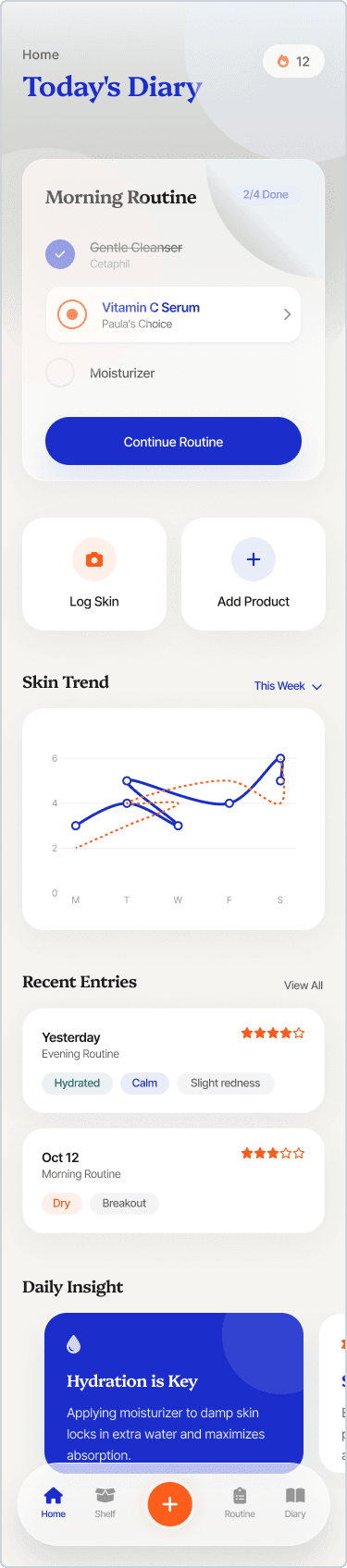
// What I tried, what I changed, whyEarly wireframes from the design phase. The shipped app adapted these — layouts were simplified and flows evolved during development.
Persistent header scoped to Home only
Initial design had AM/PM routine status as a full-width band across every screen — always visible, always reminding you to check in.
Moved status and streak to the Home tab header only. Added a badge on the Home tab icon to signal pending check-ins from other screens.
Why: A persistent banner costs ~56px on every screen. Apple HIG and Material Design both caution against non-system-level persistent elements. During testing, the header felt useful on Home but distracting when browsing the Shelf or writing a diary entry. Home is always relevant context — product browse mode is not.
Expiry alerts to replace 'recently added' on Home
Home screen shows recent diary entries below the header — useful context, but doesn't drive action.
Planned: replace with expiry/PAO alerts and routine-gap prompts that answer 'what needs my attention right now?' PAO data is already tracked per product — the UI surfacing is in progress.
Why: The Home screen should drive action, not just display history. Expiry alerts and routine gaps are time-sensitive — they're the reason someone opens the app. This change is informed by user feedback during the design phase.
Routine/Diary bridge to close the habit loop
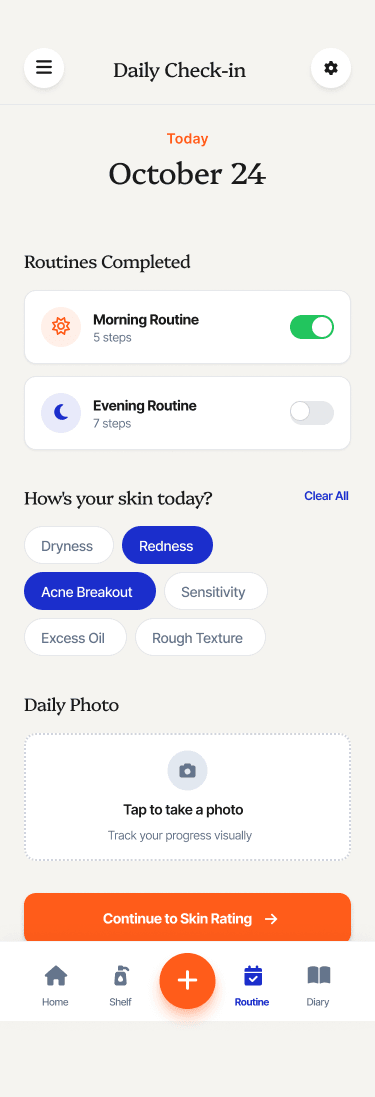
Diary and Routine live as separate tabs with no visible connection. Users complete their routine, then have to remember to log how their skin felt separately.
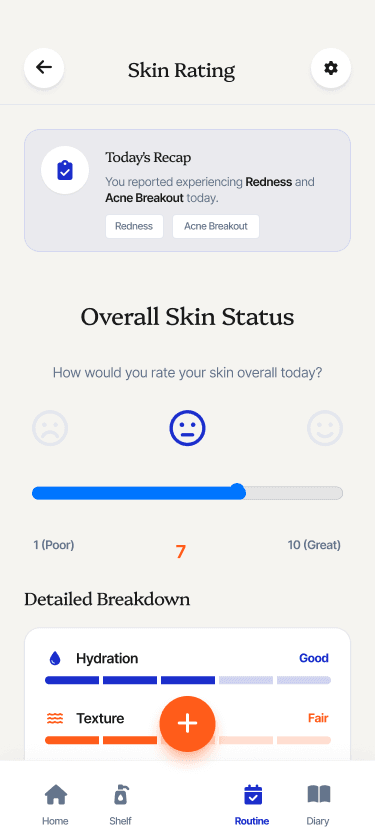
In progress: adding a diary summary (today's rating + last 7 days) at the bottom of the Routine tab, and a skin rating prompt immediately after routine completion. Currently, skin rating is a separate action via the check-in screen.
Why: Inspired by James Clear's habit stacking research: new behaviours anchor to existing ones. The tabs stay separate (the IA is correct), but the bridge will ensure the check-in loop doesn't break for users who navigate directly to Routine. Target flow: complete routine → rate skin → done.
Guest-first: useful before sign-up
Every competing app gated functionality behind account creation. Users bounced before experiencing any value.
The app works fully on first tap — no account needed. All data stored locally via AsyncStorage. Account creation prompted only when you try to sync, not when you try to use.
Why: If someone just wants to log a moisturiser, making them create an account first is a product failure. The account wall isn't just bad UX — it also forced an early GDPR consent screen that users would click past without reading. Removing it solved two problems at once.
Consent at the moment of action, not onboarding
Standard pattern: a wall of checkboxes during onboarding bundling product preferences with health-sensitive skin condition data under one 'accept all.'
GDPR Article 9 consent prompt appears only when someone tries to log a skin condition for the first time. Product tracking, routines, and diary work without any health consent.
Why: Consent collected during onboarding is meaningless — users click past it. Consent at the point of action carries context: you understand what you're agreeing to because you're about to do it. This also meant the data model had to separate health data from cosmetic data architecturally, not just in the privacy policy.
Constraints That Shaped the Design
// Constraint → decision → codeGDPR Article 9 requires explicit, granular consent for health data with independent deletion
Consent prompt appears at the moment of first health data entry, not during onboarding. Health data can be deleted without touching product or routine data.
Three-tier data model: account, cosmetic, and health in separate Supabase tables with independent Row-Level Security policies and deletion paths. Guest-to-user migration syncs health data separately, only if consent exists at time of account creation.
App must work fully offline — no network dependency for core features
Guest-first UX with local-first data. Cloud sync is an opt-in upgrade when you create an account, not a prerequisite.
Zustand stores backed by AsyncStorage as default persistence. Dirty-ID tracking per store: write locally, flag changes, push deltas to Supabase in the background. No full refreshes, no wasted bandwidth.
European skincare brands poorly covered by single barcode databases
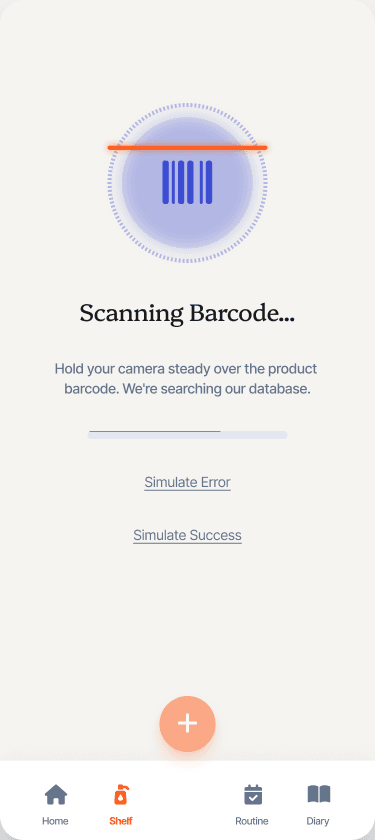
Barcode scanning should just work — scan, confirm, done. Users shouldn't have to fall back to manual entry for common products.
Dual-API pipeline: Open Beauty Facts as primary, UPCitemdb as fallback. Upstream categories mapped to 10 app categories via keyword matching. All API responses sanitised (unpredictable data, no guaranteed schema). 15-second timeout enforcement.
Expo SecureStore has a 2048-byte limit; Supabase auth tokens regularly exceed it
Token security can't be downgraded — users trust the app with health data.
Custom chunking adapter that splits large tokens across multiple SecureStore keys. Transparent to the auth flow, no compromise on token integrity.
Outcomes & Validation
// What I can point toUsha is pre-launch — there are no production metrics yet, and I'm not going to invent them. Here's what I can point to:
- 9 Maestro E2E flows covering every critical journey from onboarding through account deletion, plus Jest unit tests across all store logic
- 8 modules built in 10 weeks: onboarding, shelf, routines, diary, barcode scanning, auth, health data, settings
- Two features still in progress: expiry alerts on the Home screen (PAO data is tracked, UI surfacing is next) and the routine/diary bridge (habit loop between routine completion and skin rating)
The thing I'd want a hiring manager to take away: this isn't a tutorial project. I made real product decisions under real constraints — GDPR compliance that shaped the data model, UX research that changed the information architecture, and technical trade-offs where I had to weigh user experience against implementation complexity. Every decision is documented in the product brief and the decision log.